| Before moving on to the Index search, let's examine a special feature
of Internet Explorer. Internet Explorer can be configured to work with any
particular search engine by using an add-on piece of Windows 95 software freely available
from Microsoft. Obtain Tweak UI from www.microsoft.com/msdownload/default.htm
and proceed to Support Drivers, Patches and Service Packs - Windows95 Shareware and
Utilities - PowerToys - TweakUI.
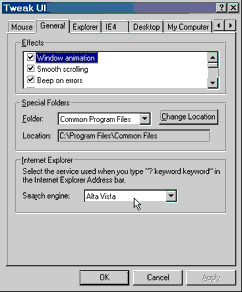
After Tweak UI is installed, use it to configure Internet Explorer's use of search
engines. Access Tweak UI from the Windows Control Panel to select your favourite
search engine.
Figure: Tweak UI settings for
IE 4

 |



 Prev
Prev
